Lighting System
Video ZLZ Anime Shader – Lighting System Overview & Behavior
Base Character Lighting
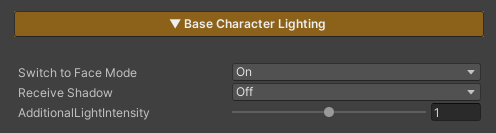
This section controls the character’s lighting and shadow behavior.
Parameters
- Switch Face Mode : Adjusts the lighting calculation to better suit the character’s facial surface, helping the face appear brighter and more readable under different lighting conditions
- Receive Shadow : Enables or disables receiving shadows cast by other objects (disabling this option does not affect the character’s ability to cast shadows onto surrounding objects)
- Additional Light Intensity : Controls the intensity of secondary lights such as Point Lights and Spot Lights; this value does not affect the main Directional Light in the scene
Soft Light

This feature applies a Soft Light color adjustment (blend mode / tone curve) to the character’s color after lighting has been calculated (Final Lit Color).
It enhances contrast and smoothness for a more subtle, softer look, and is applied only to the character’s material, without affecting the scene’s post-processing.
Parameters
- Soft Light Highlight : Controls the strength of the effect by blending between the original color and the Soft Light result
Rim Light
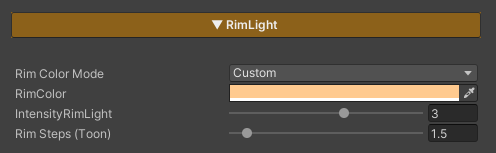
Rim Light is used to add lighting along the edges of the character to emphasize the silhouette and help the character stand out more clearly from the background. It is well suited for toon- and anime-style characters.
Parameters
- Rim Color Mode : Selects the color mode of the Rim Light
- Light : Uses the color from the Directional Light
- Custom : Allows you to define a custom Rim Light color
- Rim Color : Sets the Rim Light color when using the Custom mode
- Intensity RimLight : Controls the brightness of the Rim Light
- Rim Steps (Toon) : Controls the toon-style appearance of the Rim Light (higher values cause the Rim Light to extend further into the character surface, while lower values produce a sharper and more defined rim edge)
Hair Highlight
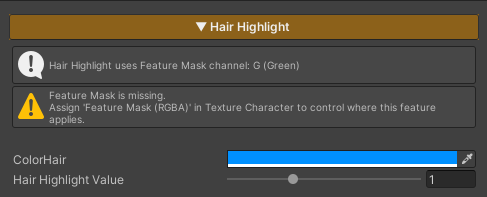
Hair Highlight is used to add light highlights to the character’s hair, with the highlight appearing only in areas that receive light.
When the hair is in shadow, the highlight will not be rendered, helping the hair appear more dimensional and improving shape readability.
This feature controls its active area through the Feature Mask (Green Channel).
If no mask is defined in this channel, the Hair Highlight will not be applied.
Parameters
- Color Hair : Adjusts the color of the Hair Highlight
- Hair Highlight Value : Controls the brightness of the Hair Highlight