← Back to Home
Grass Global Wind (ZLZ_Env Wind Controller)
ZLZ_Global_Wind is the object that holds the ZLZ_Env Wind Controller component — it acts as the single, scene-wide wind source. Any grass material (or tree/bush material) whose Wind Source is set to Global pulls all of its wind from here: direction, strength, speed, and gust timing. Tune the whole scene’s wind from one place.
Showcase
Setup ZLZ Global Wind
Done in a single step — right-click in the Hierarchy > ZLZ > Setup ZLZ Global.
How It Works
- Every value is pushed to the shader each frame, and it runs in Edit Mode too (ExecuteAlways) — the wind animates while you build the scene, no need to press Play.
- Keep one per scene. If there are several, the one enabled most recently drives the scene.
- If no controller is present, any material set to Global falls back to its own Local values (the wind never freezes or dies) — and the material inspector warns when it is set to Global but no controller is found.
- The object’s position / rotation / scale have no effect on the wind — they only anchor the gizmo arrow (blue) that shows the wind direction so you can adjust it by eye.
- The wind runs in the vertex stage of every pass (ForwardLit / ShadowCaster / DepthOnly / DepthNormals), so shadows, depth, and SSAO move with the blades instead of lagging a frame behind.
Parameters
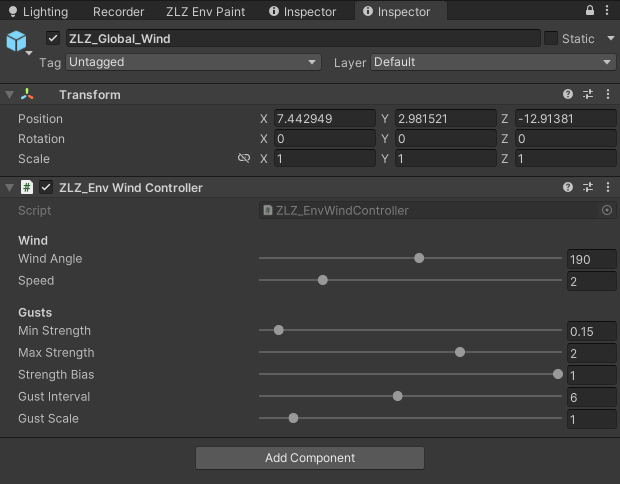
Wind
- Wind Angle (
0–360°, default190) — the wind heading on the ground plane, a single angle. The whole scene’s wind points this way (check the direction with the gizmo arrow). - Speed (
0–10, default2) — how fast the wind drifts across the scene (the rolling main sway). The fast leaf shimmer is a separate value, set per material (Leaf Flutter Speed).
Gusts
The strength here is a range, not a single level — the whole scene “breathes” up and down between Min ↔ Max together over time (every blade at the same strength at a given moment), so the wind visibly rises to a gust and falls back to calm across the whole field as one, rather than some blades being strong while others are gentle.
- Min Strength (
0–3, default0.15) — the wind strength when calm (the low end of the breathe). Each material catches this scaled by its own Wind Weight. - Max Strength (
0–3, default2) — the wind strength at the gust peak (the high end). Set Min = Max for a steady, constant wind (no breathe). - Strength Bias (
0–1, default1) — which end the wind spends more time at: low = mostly calm (Min) with the odd strong burst, high = mostly strong (Max) with brief calm spells, 0.5 = an even swing. - Gust Interval (
1–12seconds, default6) — the time per breathe cycle (the gust interval): low = frequent swings between calm and strong, high = long calm stretches then a swell. The swing is irregular like real wind, not a metronome. - Gust Scale (
0–10, default1) — the size of the gust patches on the ground = the noise the whole scene shares. Higher = smaller, tighter patches. Every Global material reads this one value, so the noise is identical across the whole scene — and it is the same noise that bends the blades and creates the Wind Gust Wave highlight band, so where the grass leans always matches where the ground brightens.