Water Caustics
The rippling web of light on the floor beneath clear water — sunlight focused by the moving surface into bright threads that weave together and crawl, endlessly. It is the single cue that tells a player at a glance “this water is clear and there is a bottom down there”, instead of a blue sheet laid over the sand.
The pattern is projected onto the floor, not stuck to the surface: it is computed from the real world position of the bottom seen through the water, so wherever the camera moves the web stays with the ground it belongs to, and the ripples slide across it rather than dragging it along.
All of it is procedural — no textures, no extra pass, and nothing at all while the feature is off.
Showcase Water Caustics
Setup
- On the water material — turn on the Caustics feature (the button grid at the top of the Inspector)
- On the URP Asset — make sure Depth Texture is on, because the system has to know how deep the floor is before it can project the web onto it
Pair it with Refraction. With Refraction on, the water shows the real bottom through the surface and the caustics land exactly on that visible bottom — the setup this was built for. Without Refraction the web still works: the surface’s own opacity is raised by the web’s brightness for you, so it punches through the clear shallows.
Nothing to bake, no component to add, no extra light to place — the web takes its colour and its light from the scene’s Directional Light.
Parameters
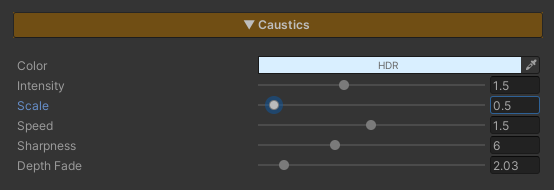
All of these live on the material under Caustics, and only appear once the feature is on.
- Color (HDR, default white) — the colour of the light web. It is already multiplied by the Directional Light’s colour, so white is the normal answer; reach for this when the light under water should read greener or bluer than the light above it
- Intensity (
0–4, default1.2) — how bright the web is.0= invisible - Scale (
0.1–8, default1) — how fine the web is, measured in world space rather than UV or mesh size. High = a tight small mesh (a swimming pool), low = a broad one (open sea). Stretch the water body as far as you like and the web keeps its size - Speed (
0–3, default0.6) — how fast the web crawls.0= frozen (still a web, just not moving) - Sharpness (
1–16, default6) — how thin the threads are. High = fine crisp lines, like very clear pool water, and a darker floor overall because the threads are thinner. Low = wide soft light spread over the whole bottom - Depth Fade (
0.1–20, default4) — how many metres of water column it takes for the web to disappear. It is brightest at the shore and falls off on an accelerating (squared) curve with depth
Why does it have to fade with depth? Two reasons that match the real thing: the focused light is absorbed before it reaches a deep bottom, and deep water in this system is already opaque (see Depth Color). Set Depth Fade near the See-Through Depth in the Depth Color section and the web will vanish right about where the bottom stops being visible.
Where the Pattern Comes From
The web is built from two layers of Worley noise at different scales and phases, combined. Each cell owns a feature point that orbits inside it on a sine, which is what makes the whole field crawl and shimmer. The bright part is the ridge between cells — the ground that is furthest from any feature point — and that ridge network is the web you see.
Two layers, because a single one reads immediately as one repeating round grid.