Emission
Make parts of a surface give off their own light — crystals glowing in a cave, house windows lit at night, a neon sign, cracks in rock with lava behind them, mushrooms glowing deep in a forest.
This light does not depend on the scene’s lighting. It is added after all the lighting has been worked out, so anything emissive stays bright even in full shadow — which is how it should be. A lamp does not go out because it is standing in the shade.
There is also Emission Pulse built in as a sub-feature, for light that beats up and down on a rhythm, with no script and no animation to author.
Showcase Emission
Setup
Turn on the Emission feature in the Features grid at the top of the Inspector and the Emission section appears.
It ships off, and while it is off these calculations are stripped out of the compiled shader.
Parameters
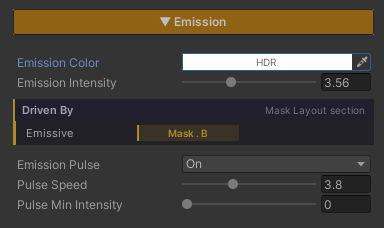
- Emission Color (default white, an HDR field) — the colour of the light given off. This field accepts values above 1 through the Intensity multiplier in the colour picker, which is the range Bloom picks up and blooms
- Emission Intensity (
0–10, default1) — the brightness. Push it past1to reach into HDR range so Bloom can take over
Emission Pulse
A sub-feature with its own on/off switch, independent of the parent. Off by default; turning it on reveals two values.
- Pulse Speed (
0.1–10, default1) — how fast the light beats - Pulse Min Intensity (
0–10, default0) — the brightness at the dimmest point of the beat
The beat is a sine wave running between Pulse Min Intensity and Emission Intensity. Put simply, Intensity is the bright end and Pulse Min is the dim end.
- Pulse Min at
0= fades out completely and comes back — right for a blinking warning light - Pulse Min close to Intensity = a gentle breathing beat — right for a magic crystal
Choosing What Glows
Left alone, the whole surface glows, which suits objects that emit across their entire body — a lamp, a crystal.
To glow only in places — windows on a house wall, cracks in a boulder — wire it to a Feature Mask channel in the Mask Layout section. White in the mask means full glow, black means none.
Underneath the sliders is a strip reporting whether the whole surface is glowing or which channel it is currently reading.
The Env Shader’s default is to glow across the whole surface, unlike ZLZ Anime Shader where a mask has to be present before the effect does anything. If you turn Emission on and the whole object lights up unintentionally, that means no mask is wired yet.
Cost
No extra texture reads. Both the Feature Mask and the surface colour have already been sampled at earlier stages; this feature itself is just a few multiplies and an add.
Emission Pulse adds a sine per pixel, which is close to free, and the whole block is stripped out when that sub-switch is off.
The single Feature Mask is shared with Metallic and Smoothness, so using Emission alongside those two costs no additional texture at all. That is the main reason the mask system is built this way.
Works With Other Features
Bloom
Emission does not make light bleed on its own — it only pushes colour values above 1. The bleed itself is Bloom’s job, in URP’s Volume. If you want a glow that spills, Bloom has to be enabled in the scene; otherwise you get a very bright colour with hard edges.
Specular & Metallic
They share one Feature Mask on different channels, so you can plan which channel drives what. See Specular & Metallic.
Paint Mode and Triplanar
Emission reads the surface colour after it has been fully assembled, so painting a layer over something or projecting it with Triplanar keeps the glow matching whatever is actually visible.
Surface Accumulation
Snow settling over a surface replaces the colour underneath it, so an area that was glowing dims as it gets covered. Which is right — a lit sign buried under snow really should go dark. See Surface Accumulation.
Limits
- It does not light anything around it. The glow lives on the surface itself and will not brighten the ground beside it. For that, place a real Light as well
- Black areas of the texture will not glow. The emission is multiplied by the surface’s own colour, and anything multiplied by zero stays zero — the area has to carry some colour in the texture first
- The bleed depends on Bloom. The feature does not produce it by itself
- The beat is one fixed sine shape. There is no choice of waveform and no per-object offset, so every object sharing a material pulses in unison
- There is one Feature Mask bank. The base surface uses a single RGBA texture, so at most 4 features can be wired at once