Grass Material
The grass material controls everything about how a blade looks — color, gradient, lighting, right down to the shadow it casts on the ground. Everything is organized into sections you can toggle on/off from the Feature table at the top; enable only what you use to keep it as light as possible.
Showcase
Features
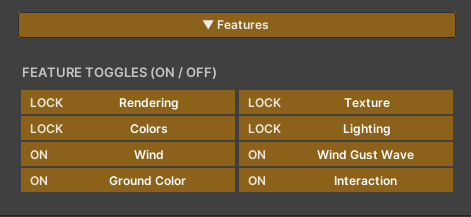
The top of the material is a grid of on/off switches for each capability. A feature that is off is compiled out of the actual calculation, so it costs nothing — enable only what you use.
- Rendering — Cast Shadow + Alpha Cutoff (Locked, can’t be turned off)
- Texture — assign the blade texture (Locked, can’t be turned off)
- Colors — the color values (Locked, can’t be turned off)
- Lighting — the grass’s light and shadow (Locked, can’t be turned off)
- Wind — grass movement driven by the wind (can be toggled)
- Wind Gust Wave — a light highlight that sweeps across the grass with the wind (can be toggled)
- Ground Color — samples color from a camera so the grass matches the Terrain (can be toggled)
- Interaction — grass reacts to characters moving through it (can be toggled)
Rendering

- Cast Shadow — whether blades cast a shadow onto the ground. Turn it off to save cost in scenes with very dense grass
- Alpha Cutoff — the cutoff for the blade’s shape (default
0.6). It sits slightly above 0.5 on purpose: with mipmaps the blade’s alpha edge averages toward 0.5, which makes distant grass shimmer. Raising it to 0.6 removes that shimmer
Texture
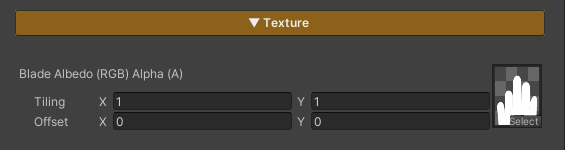
- Blade Albedo —
Blade Albedo (RGB) Alpha (A)provides the shape and color of the blade as usual (most setups use only the alpha channel for the blade shape and let the Height Gradient provide the color)
Base Colors
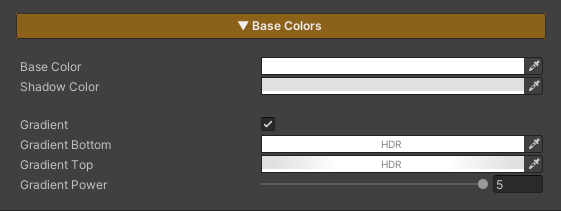
- Base Color — the main color of the blade where it is lit
- Shadow Color — the color of the blade where it is in shadow
The gradient tints the blade from base to tip along its height (turn it off by setting both colors the same). A standard grass setup usually uses just the blade’s alpha + this gradient for color, so no albedo texture is needed.
- Gradient — enable/disable the height-based color gradient
- Gradient Bottom — the color at the base of the blade (HDR supported)
- Gradient Top — the color at the tip of the blade (HDR supported)
- Gradient Power — the curve of the gradient. Low = a soft blend across the whole blade, high = the tip color stands out only near the top
Lighting
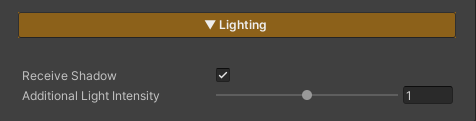
- Receive Shadow — whether blades receive shadows from other objects
- Additional Light Intensity — how much the grass picks up from other lights (Point/Spot) besides the main light
Note: grass does not receive Screen-Space AO on purpose. A dense alpha-tested grass field turns into a dirty smear under SSAO, so blades keep the clean toon shading that matches the character shader.
Wind
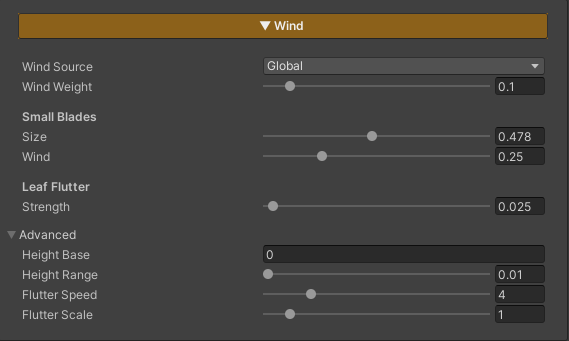
Grass sways with the wind, reading its direction/strength directly from the scene’s ZLZ_Global_Wind system. Toggle the whole set with the Wind feature.
- Wind Source — choose where the wind values come from
- Global — use the central wind from the scene’s Wind Controller (direction / strength / speed / gust are all driven from one place, so every grass field sways in sync). Only Wind Weight is left to tune = how much this field picks up the central wind (0 = still, 1 = full)
- Local — set the wind on this material alone; extra values appear:
- Wind Strength — the wind force (how far the blade tips lean)
- Wind Speed — how fast the sway moves
- Wind Direction (deg) — wind direction
0–360° - Wind Gust Scale — the size of a gust (the strong/weak wind waves sweeping across the field). Larger = wider gusts
Small Blades
Make small blades sway differently from large ones for a more natural look.
- Size — blades no taller than this fraction of a full-grown blade count as “small”
- Wind — how much wind the small blades receive (
0= perfectly still,1= same as normal grass)
Leaf Flutter
- Strength — the strength of the fast fluttering at the blade tip, layered on top of the main sway
Advanced
Already correct for standard grass (vertical blade UV 0..1) — open this only when using a different mesh or blade shape.
- Height Base / Height Range — the height range of the blade the wind affects. The wind starts at Base and ramps up to full across Range (base stays still, tip sways the most)
- Flutter Speed / Flutter Scale — the speed and frequency of the tip flutter
Wind Gust Wave

A bright highlight band that sweeps across the field with the wind, so you can see the “wind wave” running over the grass. It uses the same noise that bends the blades (a bright band = where the grass is being pushed by the wind). Toggle it with the Wind Gust Wave feature.
- Wave Strength — the brightness of the sweeping gust band
- Wave Contrast — high = sharp, defined bright patches, low = a soft even wash across the whole field (the noise’s size / direction / speed is owned by the scene’s Wind Controller)
Interaction

Blades bend away when a character or object moves through them, and spring back once it leaves. It runs on the GPU with no per-blade colliders. Toggle it with the Interaction feature — what actually pushes the grass is the ZLZ_Env Grass Interactor component (see the full setup on the Grass Interaction page).
- Push — how far the blade tip slides away from an interactor
- Flatten — how hard the blade is pressed flat inside an interactor’s radius
Debug

Debug Mode — a dropdown that picks an inspection view, skipping the real shading to show the raw value of each stage. Always set it to Off for actual use.
- Off — production mode, normal rendering
- Wind Mask — shows the height range of the blade the wind affects (white = the tip that sways fully, black = the base that stays still)
- Ground Color — shows the color sampled from the Ground Color Map directly, to check the texture is bound and the world UV is correct (all white = no texture bound, seeing the ground image = bound correctly). Works even with the Ground Color toggle off
- Shadow — the raw main-light shadow value (white = fully lit, black = in shadow). If it stays white even under a cast shadow, the shadowmap isn’t being sampled
- Interaction — the pixels inside an interactor’s radius (white = being pushed). It reads the central interactor list directly, so it works for troubleshooting even with the toggle off — all black = no interactor data is reaching the shader; white rings around the character = the data is fine and the issue is the Push/Flatten strength or the radius
- Gust Wave — the same gust noise the blades actually bend with (white = a strong gust patch). Works even with the feature off, so you can tune the Wind Controller’s Gust Scale by eye here
- Wind Response — how much wind each blade receives, based on its size relative to a full-grown blade (green ramp: dark = a small blade that barely moves, bright = a full-size blade catching 100%). The Edge Falloff around a mask or an avoided object should read dark