Water Floater
Make anything float in one click — a boat, a barrel, a buoy, a leaf. Every frame the component finds the water body under the object and moves its height to sit exactly on the surface the player sees.
If the water has Waves (Shore Breath) on, the object rides the rhythm too: the C# side reads the same curve, the same height and the same clock as the shader, rather than approximating them. Without Waves the object simply rests at the surface level.
No physics, no colliders — it writes the transform directly, so it stays very cheap.
Showcase Water Floater
Setup
- The water body needs the
ZLZ_EnvWatercomponent (water created from the Dashboard or the Base Prefab already has it) - Add the
ZLZ_Env Water Floatercomponent to whatever should float
ZLZ_EnvWateris required. The floater looks up water bodies through the registry that component maintains. On a bare water mesh without it there is no known surface level, so the floater does nothing at all.
Parameters
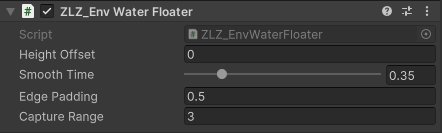
- Height Offset (metres, default
0) — how far the object settles above (+) or below (−) the water level. Negative sinks the hull in (a loaded boat); positive rides proud (a cork) - Smooth Time (
0–2seconds, default0.35) — how long the object takes to settle onto a changed water level. Gives it a heavy, damped feel;0welds it to the surface (a leaf) - Edge Padding (metres, default
0.5) — extra metres around a water body’s footprint that still count as “over this water”, so a boat nosing the bank keeps floating - Capture Range (metres, default
3) — the distance within which the floater takes hold. Beyond it the object is left alone, so a barrel carried across a bridge is never yanked down onto the surface.0= unlimited, always snap
Behaviour Worth Knowing
- Y axis only. X and Z are untouched, so gameplay code keeps steering the boat as usual
- No rocking or heeling, deliberately. The Shore Breath lift has no slope, and a bobbing rotation would advertise a slope the water does not have. For a rolling boat, layer an animation or your own script on top
- Over no water it does nothing. It never invents gravity, so carrying a barrel ashore just works
- Several water bodies at different heights are supported. When the object sits over more than one at once (say a raised pond above a lake), it picks the body whose surface level is vertically closest
- Gizmos — select the object and look in the Scene view: cyan = the floater will take hold, orange = water is there but the object is outside Capture Range, grey = no registered water under the object. The line running out to the small square shows where it will settle
- The surface level is read from the top of the water mesh’s bounds, not its transform. If the water is a thick box rather than a thin plane, the object floats on the top face of that box — which is the surface you see anyway
Works With Other Features
Waves (Shore Breath)
The floater’s main partner. The C# side does not approximate anything: it reads the same baked curve the same way the shader does (including the interpolation between points and the loop wrap), on the same clock. The object tracks the visible surface every frame, never sinking under or hanging above it at the top of the swell.
See the Water Waves page for drawing the rhythm.
Water Interaction
The floater does not disturb the water by itself. To have a boat leave a wake behind it, add the ZLZ_Env Water Interactor component to the same object. The two run independently and never fight — one owns the height, the other owns the ripples.
See the Water Interaction page.
Rigidbodies and Gameplay Code
The floater writes transform.position every frame. If the object carries a non-kinematic Rigidbody, physics and the floater end up fighting over the position, which shows up as jitter or a body that never sleeps — the component logs a warning in the Console as soon as it spots one.
There are two ways to go.
- Keep the Rigidbody kinematic while afloat and let the floater own the height. Suits a boat the player drives
- Skip the floater and drive the Rigidbody with forces, asking the system for the surface height directly. Suits objects that need real collisions
using ZLZ.AnimeShader;

// The water body under this object (null when there is none)
ZLZ_EnvWater water = ZLZ_EnvWater.FindWaterAt(transform.position, 0.5f);
if (water != null)
{
    // Surface height right now, Shore Breath lift included
    float surfaceY = water.GetSurfaceHeight();
    float submerged = surfaceY - transform.position.y;
    if (submerged > 0f)
        rb.AddForce(Vector3.up * submerged * buoyancy, ForceMode.Acceleration);
}
GetSurfaceHeight() is the same call the floater itself uses, and it is safe to call every frame — it allocates nothing.
Good to Know
- Play mode only. In Edit Mode the object does not ride the waves, but the gizmo shows where it will settle, which is what you want while placing props
- Waves is not required. On still water the object simply sits at the surface level (plus Height Offset)
- It runs in
LateUpdate, after gameplay code has moved the character or boat, so the Y it writes is always the final word - It honours
Time.timeScalelike the waves do — slow motion slows the bobbing with everything else - No cap on how many. Unlike Water Interactor with its 16 simultaneous ripples, you can have as many floaters in a scene as you like: each one works on its own and sends nothing to the shader
- One per object