Triplanar
Lay textures onto a mesh while ignoring its UVs entirely — the system projects the texture in from the three world axes (top, front, side) and blends them by the direction the surface faces. A cliff, a rock or a blockout box whose UVs are stretched, or which has no UVs at all, tiles cleanly: no smearing, no seams.
It is an enormous shortcut for environment work: sculpt a cliff in Blender and drop it straight into Unity — no time spent unwrapping, and no worry that reshaping it later will break the UVs.
And because the pattern is anchored to world coordinates, separate meshes placed next to each other tile as one continuous surface. A cliff assembled from ten rocks reads as one rock face rather than ten pieces each carrying their own patch of texture.
Showcase Triplanar
Setup
Turn on the Triplanar feature in the Features grid at the top of the material — that is the whole setup. Nothing else to configure, no UVs needed, nothing to bake.
Once it is on, the Texture section rearranges itself:
- A blue
TRIPLANAR ONbadge appears at the top of the section, telling you the tiling is world-space from now on - Unity’s Tiling / Offset fields disappear, replaced in the same spot by World Tiling and Blend Sharpness
Each mode keeps its own values. Switch Triplanar back off and the old Tiling / Offset numbers are still there, untouched — so you can flip between the two to compare results without losing anything.
Parameters
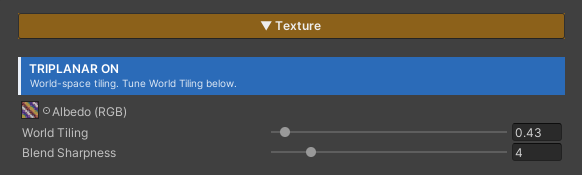
- World Tiling (
0.01–10, default1) — how frequently the pattern repeats against the real world. Higher = it repeats more often (the pattern looks smaller). This one value drives the Albedo, the Normal Map and the Feature Mask together, so all three always line up - Blend Sharpness (
1–20, default4) — how hard or soft the three axes cross-fade into each other. High = biased toward whichever axis the surface faces most, giving a crisper seam. Low = a wider, softer blend
Blend Sharpness only shows on curved or sloped surfaces. A straight wall or a flat floor already faces one axis head-on, so turning the value barely changes anything. To see it clearly, try it on a sphere.
What Switches to World Space
| Part | With Triplanar on |
|---|---|
| Albedo | projected from the three world axes |
| Normal Map | projected from the three world axes, and resolved directly in world space |
| Feature Mask (RGBA) | projected from the three world axes, so Metallic / Smoothness / Emissive still match the pattern you see |
| Paint Layer textures | projected from the three world axes, and each layer carries its own World Tiling |
| Paint Mask | stays on UVs, because the brush paints in UV space |
The three-axis blend weights are computed once per pixel and shared by every texture, so the Albedo, the Normal and the Mask are locked to exactly the same projection and can never drift apart.
The Normal Map has no Tiling field of its own — in either mode. It always follows the Albedo’s mapping (it is hidden in the shader itself), because otherwise you would get a surface whose colour detail and bump detail do not line up.