← Back to Home
Grass Setup
Plant grass on your Terrain in just a few steps. Everything is controlled from a single place, the ZLZ_Env Dashboard, and one scene can hold many grass types at once.
Showcase Grass Grow One-Click
Showcase Grass Custom Paint
Showcase Grass Grow Multi Types
Setup Steps
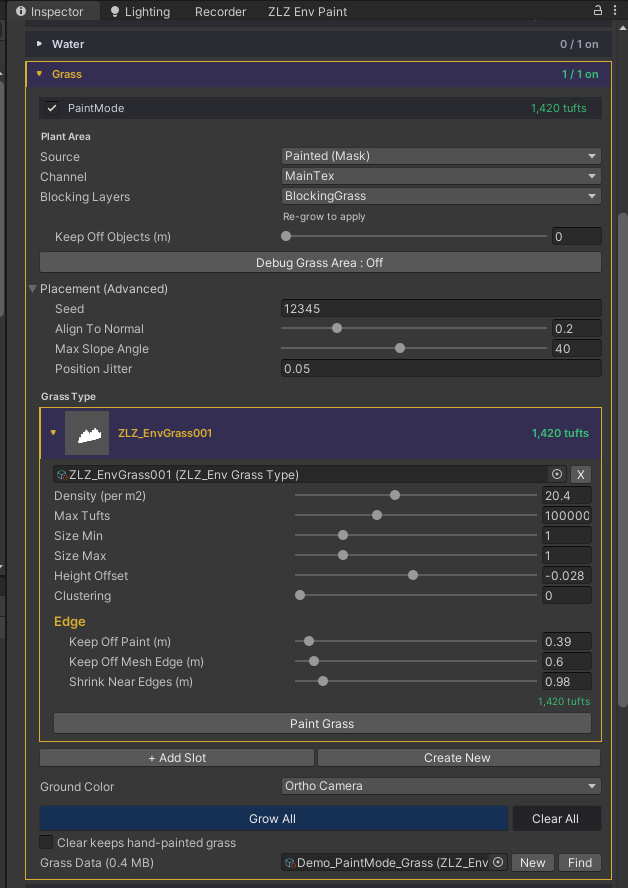
- Place the Dashboard: add
ZLZ_Env Dashboardto the root of your environment (above all ground meshes). Every mesh under it appears in the panel with an On/Off switch. - Choose where to plant: tick on the meshes you want grass to grow on.
- Source: choose where grass grows across the mesh.
- Uniform: grass covers the whole mesh.
- Painted (Mask): grass grows only where you have painted the ground, following the ground material’s Texture Paint. For example, if the ground is painted with a grass zone and a sand zone, grass grows only in the grass zone and stays off the sand.
- Grass Type: pick or create a Grass Type. Ready-made presets are included:
- 5 grass types
- 4 lying flower types
- 1 standing flower type in 4 colors
- or create your own Grass Type
- Grow All: press
Grow Alland the grass is generated from your settings. - Paint more (optional): press
Grow Allfirst, then drag the mouse across the ground to paint extra grass by hand.
Creating Your Own Grass Type
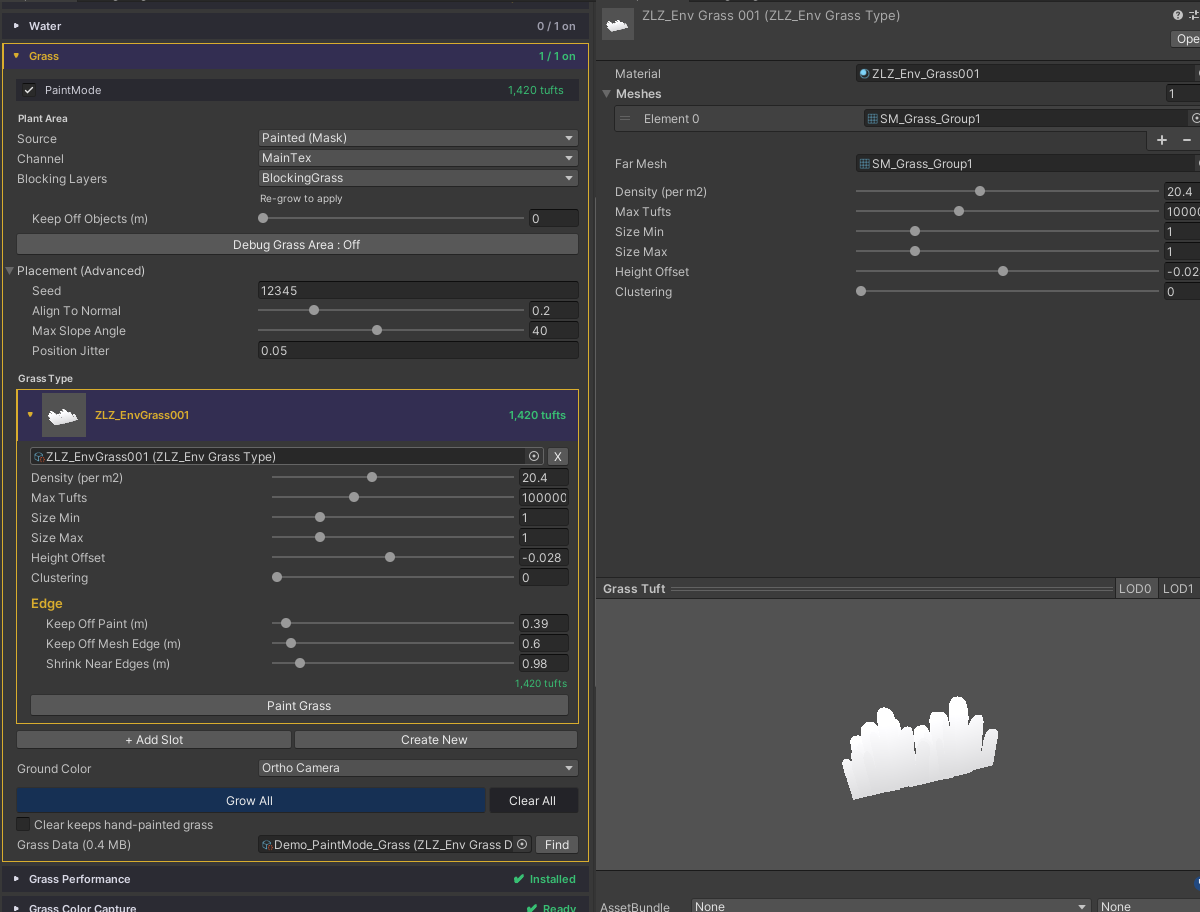
- Press
Create Newon the Grass Type field in the Dashboard. - The new file is created at
Assets/ZLZ_EnvironmentShader/Grass/Types/ZLZ_GrassType.asset. - Every setting can be edited directly on the Grass Type:
- Material: the material for this grass or flower (each asset has a live preview so you can tell them apart).
- Meshes: the mesh(es) for LOD 0. You can add several, and one is picked at random per tuft.
- Far Mesh: the mesh for LOD 1 (the far field). Leave it empty to use the full LOD 0 mesh at every distance.
- Density (per m2): how densely this type is planted per square metre. Higher means thicker grass.
- Max Tufts: a safety cap on this type’s count, so grass can never explode on a very large surface.
- Size Min: the smallest size for this grass or flower.
- Size Max: the largest size. Each tuft gets a random size between Min and Max.
- Height Offset: sinks or raises the base of the grass or flower. Use a small negative value to push the base into the ground so blades do not float.
- Clustering: higher values make grass and flowers gather into patches (0 = an even scatter, like normal grass). When Clustering is on, a
Patch Sizeslider appears to set how wide each patch is.
Where Is Grass Data Stored
Grass is stored in ZLZ_EnvGrassData, located at Assets/ZLZ_EnvironmentShader/Baked/GrassData/.
- One Grass Data file works with one Dashboard only. Growing again with the same Grass Data overwrites the previous data immediately.
- Press
Newto create a fresh Grass Data file yourself.