← Back to Home
Dissolve FX Runtine
Demo Dissolve Runtime

Auto Setup
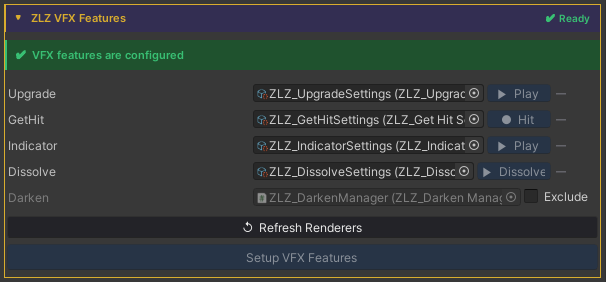
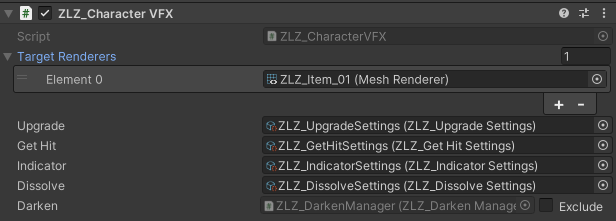
Done in a single step, just click Setup VFX Features and Refresh Renderers.
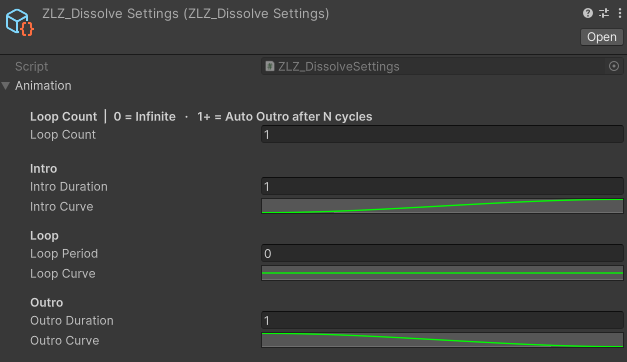
Adjust Animation Curve
Usage
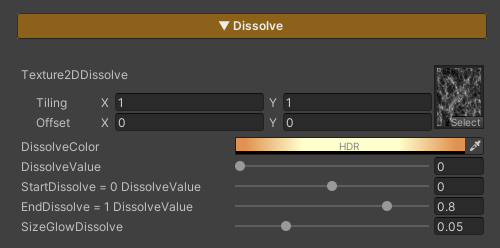
Dissolve Character is used to gradually fade a character out of the scene. It is commonly applied when a character dies, warps, or is removed from the scene. The effect allows flexible control over the pattern, color, and timing of the dissolve.
Parameters
- Texture2DDissolve : Uses a noise texture to define the dissolve pattern. Tiling can be adjusted to achieve the desired look
- Dissolve Color : Adjusts the color of the glow displayed along the dissolve edges
- Dissolve Value : Controls the dissolve state (0 = disabled / 1 = fully dissolved and invisible)
- Start Dissolve : Adjusts the starting point of the dissolve effect. Lower this value if the effect starts too quickly or appears abrupt; increase it if the effect starts too late
- End Dissolve : Adjusts the ending point of the dissolve effect. Used to fix cases where the character is still partially visible when Dissolve Value reaches 1, or disappears too quickly
- SizeGlowDissolve : Controls the size of the glow edge displayed during the dissolve
Scripting
Add using ZLZ.AnimeShader; and get a reference to ZLZ_CharacterVFX, then access the Dissolve block:
// Dissolve out (death / despawn) - plays 0 → 1, then holds
vfx.Dissolve.Dissolve();
vfx.Dissolve.Restore();    // optional: animate back to visible (1 → 0)

// Spawn in - animates from dissolved (1) to visible (0)
vfx.Dissolve.SetInstant(1f);    // pre-set fully dissolved
vfx.Dissolve.Spawn();            // then fade in

// Check state
bool active = vfx.Dissolve.IsActive();
Example - dissolve on death:
void OnDeath(GameObject character)
{
    character.GetComponent<ZLZ_CharacterVFX>()?.Dissolve.Dissolve();
}
Example - spawn a character into the scene:
void SpawnCharacter(GameObject character)
{
    var vfx = character.GetComponent<ZLZ_CharacterVFX>();
    if (vfx == null) return;
    vfx.Dissolve.SetInstant(1f);   // hide instantly
    vfx.Dissolve.Spawn();           // fade in
}
Example - teleport (dissolve out → move → spawn in):
IEnumerator Teleport(GameObject character, Vector3 destination)
{
    var vfx = character.GetComponent<ZLZ_CharacterVFX>();
    if (vfx == null) yield break;
    vfx.Dissolve.Dissolve();
    yield return new WaitForSeconds(1f);
    character.transform.position = destination;
    vfx.Dissolve.Spawn();
}