← Back to Home
Selection Outline

Give your players instant visual feedback - highlight characters, enemies, or items with an animated outline that pulses and fades with style.

Overview
Selection Outline is a URP Renderer Feature that draws an animated silhouette outline around any GameObject at runtime. Designed for combat systems, lock-on targeting, and interactive objects, works on both PC and Mobile.
- 3 built-in types : Character, Enemy, Item (each with its own color and HDR support)
- Adjustable outline color and width per type
- Smooth animation : Intro fade-in → Loop pulse → Outro fade-out
- One-click setup via Character Dashboard
- API-driven : call Select() and Deselect() from any script
- Supports Orthographic cameras
Setup
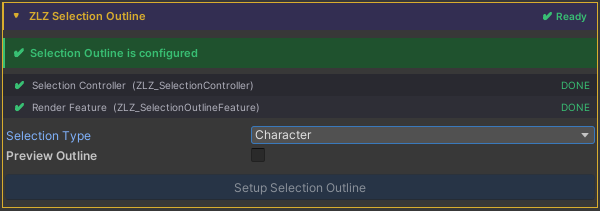
1.Open the Character Dashboard in the Inspector → choose a Selection Type (Character, Enemy, or Item)
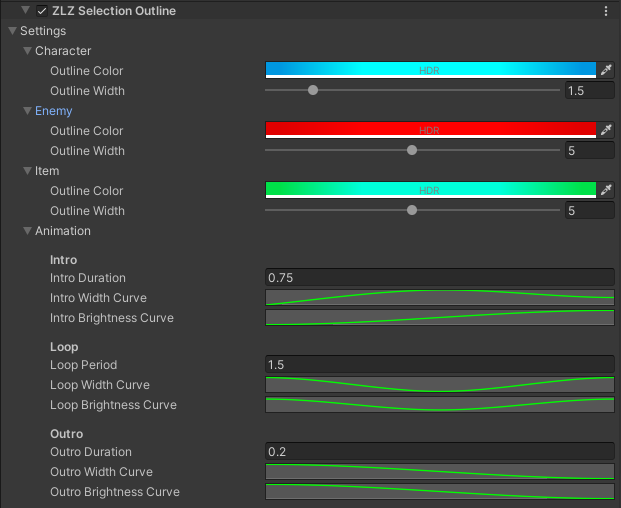
2.Open Universal Renderer Data and find ZLZ Selection Outline → adjust color, width, and Animation Curves here
Scripting
Add using ZLZ.AnimeShader; and get a reference to ZLZ_SelectionController,
then call:
// Animated (recommended) - plays Intro → Loop → Outro
ctrl.Select();
ctrl.Deselect();
ctrl.ToggleSelection();

// Check state
bool active = ctrl.IsSelected();
Example - highlight on click:
void OnMouseDown()
{
    GetComponent<ZLZ_SelectionController>().ToggleSelection();
}
Example - highlight on lock-on:
void LockOn(GameObject target)
{
    target.GetComponent<ZLZ_SelectionController>()?.Select();
}

void Unlock(GameObject previous)
{
    previous.GetComponent<ZLZ_SelectionController>()?.Deselect();
}