← Back to Home
GetHit FX Runtine

Demo GetHit Runtime
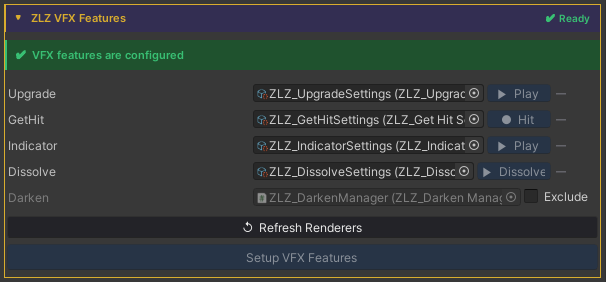
Auto Setup
Done in a single step, just click Setup VFX Features and Refresh Renderers.
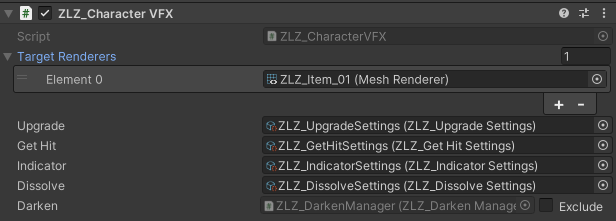
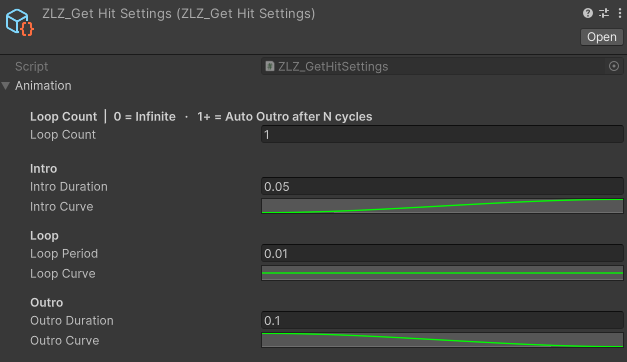
Adjust Animation Curve
Usage
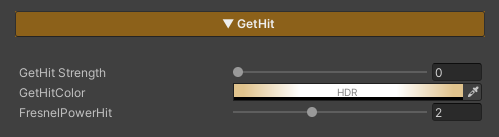
Get Hit is a feature used to visualize when a character is attacked, providing immediate visual feedback so players can clearly recognize that a hit has occurred.
Parameters
- GetHit Strength : Controls the Get Hit effect (0 = off / 1 = on)
- GetHit Color : Adjusts the color applied to the character when Get Hit is triggered
- FreshnelPowerHit : Controls the position and width of the edge effect around the character
(higher values bring the effect closer to the silhouette edge)
Scripting
Add using ZLZ.AnimeShader; and get a reference to ZLZ_CharacterVFX, then access the GetHit block:
// Trigger the hit flash - plays Intro → Loop → Outro, auto-fades
vfx.GetHit.Hit();
vfx.GetHit.Deactivate();   // cancel mid-flash (rare)

// Check state
bool active = vfx.GetHit.IsActive();
Example - flash on taking damage:
void TakeDamage(int amount)
{
    health -= amount;
    GetComponent<ZLZ_CharacterVFX>().GetHit.Hit();
}
Example - flash an enemy when hit by a player attack:
void DealDamage(GameObject enemy, int amount)
{
    enemy.GetComponent<ZLZ_CharacterVFX>()?.GetHit.Hit();
}