LightSweep

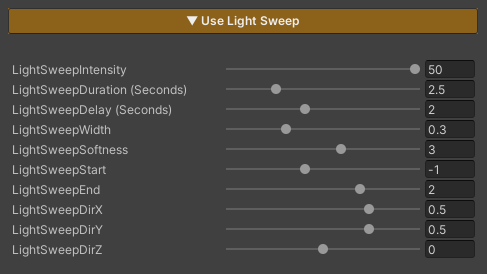
Light Sweep is a feature that adds a moving light effect sweeping across an object.
It is used to showcase equipment or important elements, such as weapons, high-tier items, characters during upgrades, or special moments.
When this feature is enabled, the effect plays immediately and runs in a continuous loop based on the configured values.
Parameters
-
LightSweepIntensity : Controls the brightness of the light sweep
(higher values make the light more pronounced)
- LightSweepDuration : Duration of one sweep cycle (seconds)
- LightSweepDelay : Delay after one cycle ends before the next cycle starts (seconds)
-
LightSweepWidth : Width of the light sweeping across the object
(lower values = narrower light / higher values = wider light)
-
LightSweepSoftness : Controls the sharpness of the light edges
(lower values = sharper edges / higher values = softer edges)
- LightSweepStart : Starting point of the Light Sweep
- LightSweepEnd : Ending point of the Light Sweep
- LightSweepDirX : Controls the sweep direction on the X axis (1 = right → left / -1 = left → right)
- LightSweepDirY : Controls the sweep direction on the Y axis (1 = top → bottom / -1 = bottom → top)
-
LightSweepDirZ : Controls the sweep direction on the Z axis
(1 = back → front / -1 = front → back)
Light Sweep directions can be combined.
For example:
`LightSweepDirX = 1` and `LightSweepDirY = 1` will result in a diagonal sweep toward the upper-right direction.