Target-Darken FX Runtine

Demo Target-Darken Runtime
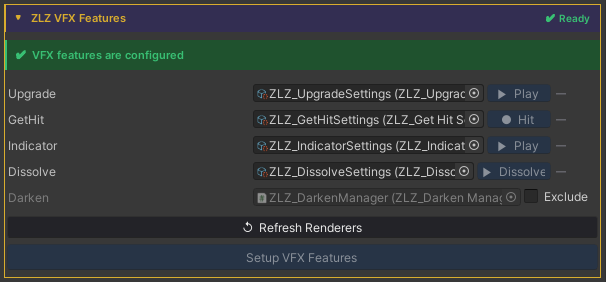
Auto Setup
Done in a single step, just click Setup VFX Features and Refresh Renderers.
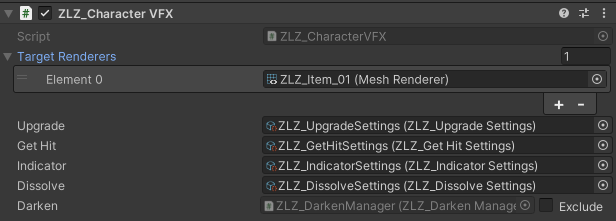
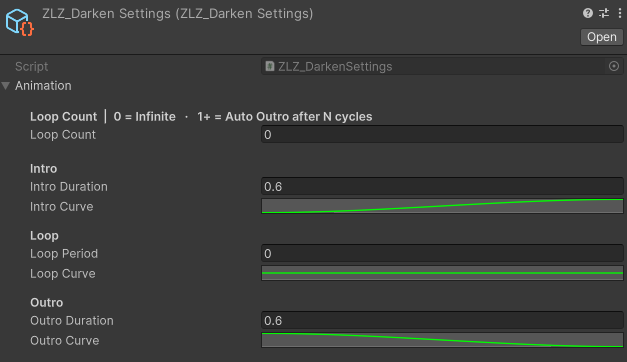
Adjust Animation Curve
Usage
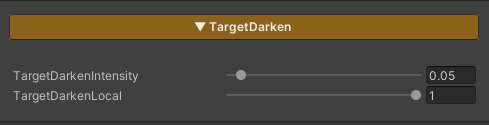
Target Darken is a feature used to reduce the brightness of selected characters in order to draw attention to specific ones, such as characters using skills, appearing in cutscenes, or highlighted during important moments in a scene.
Concept
The Target Darken system separates control into two levels:
- Global : Enables or disables Darken mode for all characters in the scene
- Local : Determines whether each individual character is affected by Darken
Overall concept
- Global = Enables Darken mode for the entire scene
- Local = Selects which characters are not darkened
Parameters
-
TargetDarkenIntensity : Controls how dark the character becomes
Lower values → the character appears darker
- TargetDarkenLocal : Controls whether an individual character is affected by Darken
0= Not darkened (remains fully lit)1= Darkened
- _TargetDarkenGlobal : A property intended for developer-side control
- Not exposed in the Inspector
- Used to switch all characters into Darken mode simultaneously
A test script is provided for evaluation
- Enable the Target Darken feature in the character’s material
- Set
TargetDarkenLocal = 1→ the character can be darkened - Set
TargetDarkenLocal = 0→ the character will not be darkened
- Set
-
Create an Empty GameObject and attach the script
Assets/ZLZ_AnimeShader/Demo/Scripts/ZLZ_DarkenDemo.cs - Test by adjusting the Global Darken value in the script (0 = normal brightness / 1 = darkened)
Scripting
Target Darken has two layers, a scene-wide controller animates the global value, and each character can opt out to stay bright.
Global control (scene-wide) Add using ZLZ.AnimeShader; and access the manager via its static Instance:
**Required:** Add a **ZLZ_DarkenManager** to your scene (Add Component → ZLZ/Anime Shader/ZLZ_Darken Manager)
before calling `ZLZ_DarkenManager.Instance`. Without it, `Instance` is null and the call throws a NullReferenceException.
// Animated (recommended) - plays Intro → Loop → Outro
ZLZ_DarkenManager.Instance.Darken();
ZLZ_DarkenManager.Instance.Restore();
ZLZ_DarkenManager.Instance.ToggleDarken();
ZLZ_DarkenManager.Instance.SetInstant(0.5f);   // direct value (no animation)

// Check state
bool active = ZLZ_DarkenManager.Instance.IsActive();
Per-character control (opt out of global)
Get a reference to ZLZ_CharacterVFX, then access the Darken block:

// Stay bright when global darken is active (local = 0)
vfx.Darken.Exclude();
vfx.Darken.Include();             // follow global again (default)
vfx.Darken.SetExcluded(true);     // direct boolean

// Check state
bool excluded = vfx.Darken.IsExcluded;
Example - toggle global darken from a button:
void OnDimButtonClicked()
{
    ZLZ_DarkenManager.Instance.ToggleDarken();
}
Example - cinematic spotlight on a boss (everyone else darkens):
void OnBossAppear(GameObject boss)
{
    boss.GetComponent<ZLZ_CharacterVFX>()?.Darken.Exclude();
    ZLZ_DarkenManager.Instance.Darken();
}

void OnBossDefeated(GameObject boss)
{
    ZLZ_DarkenManager.Instance.Restore();
    boss.GetComponent<ZLZ_CharacterVFX>()?.Darken.Include();
}