Rim Light
Add a band of light along the edges of a surface that face the sun — the lit outline on a boulder, the bright rim along a tree trunk, the edge of a roof catching the light. It lifts the silhouette away from the background and gives environment pieces the same anime read as the characters standing in front of them.
This is the same feature as ZLZ Anime Shader’s Rim Light — the same parameters, the same defaults and the same maths. A rock and the character on top of it take the same edge off the same sun, so the two sit together with no extra tuning. The one place it behaves differently on purpose is inside cast shadows, explained below.
Setup
Turn on the Rim Light feature in the Features grid at the top of the Inspector and the Rim Light section appears.
It ships off, and while it is off these calculations are stripped out of the compiled shader.
Parameters
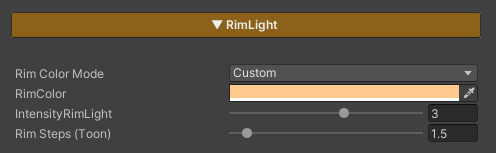
The four controls are the same, in the same order, as in ZLZ Anime Shader — if you have set up a character, there is nothing new to learn here.
- Rim Color Mode (default
Light) — where the rim takes its colour from- Light — the colour of the main Directional Light, so the rim warms at sunset and cools at night along with the scene
- Custom — the Rim Color below
- Rim Color (default white) — the rim colour when Rim Color Mode is
Custom - Rim Intensity (
0–5, default3) — how bright the rim is - Rim Steps (Toon) (
1–8, default1.5) — how the rim is cut into toon bands. Higher values add more bands that reach further in from the edge toward the middle of the surface. Lower values keep the rim to a thin, hard line at the very edge
How the Rim Is Built
Three things decide where the rim shows up:
- The edge — the rim is strongest where the surface turns away from the camera, and fades to nothing where the surface faces the camera head-on
- The toon step — that edge is cut into hard bands by Rim Steps, instead of a soft gradient
- The lit side — the rim only shows on the side of the surface facing the light. The side facing away from the sun gets no rim
Where It Differs From ZLZ Anime Shader
Rim Light Respects Cast Shadows
On a character, the rim keeps glowing even inside a shadow cast by something else — on a character that reads as a backlight, and it is wanted.
A scene is different. It is covered in cast shadows — a tree over the ground, a prop against a wall — and a rim glowing inside them reads as an error. So in the Env Shader, when Receive Shadow is on, the cast shadow is folded into the rim, and the rim goes dark wherever another object shades the surface.
| Receive Shadow | Rim inside a cast shadow |
|---|---|
| On (default) | Goes dark, together with the rest of the lighting |
| Off | Keeps glowing — exactly like ZLZ Anime Shader |
Scenes With No Directional Light
When the scene has no Directional Light — a fully baked scene, for example — the rim is drawn by the Ambient Fallback light, the same stand-in light Specular uses. The rim never quietly disappears just because the scene has no realtime sun.